
If there are add-ons that become almost universal, it’s arguable that FSDreamTeam’s GSX Pro is one of those that everyone seems to have. Sure, not everybody wants (or needs) the ground handling stuff in Microsoft Flight Simulator 2020 or 2024 (and other simulators as well), this being somewhat reserved for those seeking “immersion”. Even the very useful pushback mechanic is available with a simple default simulation, or as part of the more elaborate EFB on some aircraft add-ons. But there is something fascinating about preparing the plane and hearing the passengers boarding. Or when you are about to leave the gate and you call the ground crew to prepare the aircraft for departure. GSX does that and more, in a long list of features that some players now consider absolutely “essential”.
But there is still a small area where GSX is just not “right there” yet. The cockpit communication with the ground crew, in the old days of real aviation, was mostly gestures and intuition. Needless to say, it wasn’t the best to communicate, especially with noisier jetliners and taller cockpits entering service. So at some point, ICS or Internal Communication Systems were introduced, basically an internal radio setup to allow the pilots to reach the ground crew via a closed circuit, with the ground personnel connecting to the aircraft using a radio headset. Let’s just say GSX does simulate this, but to a very limited degree.

Looking at the product title we are reviewing here today, you know what it does already. Cockpit2Ground doesn’t leave many doubts about what it intends to do. Yes, this is precisely an enhancement to the cockpit-to-ground communication, between the pilots and the ramp agent (or pushback operator, depending on the airport you’re operating in). If you value the realism of everything you do in your flight simulator, you might have concluded this particular GSX interaction isn’t the best, often very “mechanical” and repetitive. Well, Cockpit2Ground got you covered.
It’s not often that you see a product being developed with another product as a dependency. Of course, all add-ons for Microsoft Flight Simulator work on that basis, but I’m talking about third-party products developed to work with other third-party products. All community mods are obviously developed like this, but those are usually freeware distributed with no financial outcome. When we talk about payware using other payware as a basis, I can’t imagine the possible legal implications of it. Of course, most of the time agreements are settled and, let’s face it, common sense also needs to prevail. One program can co-exist with the other, actually helping each other’s sales. I am confident that this is how both parties agreed to it… or I hope it is.
“Good afternoon, cockpit. Headset connected. Coffee? Tea?”
The team building this is actually surprising. This app is signed by AviationLads. That’s right, the guys that often bring us those amazing promotional videos, quite a departure from their comfort zone. More than just having a good idea, these guys actually decided to “roll up their sleeves” and build something in almost total secrecy. Even though I was testing this product for a few days, searching for anything about it returned nothing. The team wanted to keep it under wraps until the embargo day and I think they succeeded.

Ideas are great, but you need the “1s and 0s” too. These are done by the boys at LAND3 Simulations, the same guys behind the amazing vRAAS add-on. So, using that previous project as a base for our scrutiny, you can expect two things: a solid software build with lots of options to work with and constant updates and improvements over time. I really like vRAAS as a simple tool I can use on most aircraft that don’t have their own integrated Runway Awareness and Advisory System (RAAS), so most likely I was going to enjoy their work in Cockpit2Ground.
But, before I talk about what the program does, first we need to understand what it doesn’t intend to do. Understand that this product doesn’t replace GSX ground handling operations at all. In fact, you need to have FSDT GSX Pro for MSFS installed for it to even work. This is an enhancement for GSX, meaning that it won’t actually interfere with that program’s functionalities. Think of it as a “comms improvement” that reads what the main program does and gives you richer aural cues in the shape of simulated radio communications via ICS. Everything works as it always worked before in GSX. It will just “sound” different.
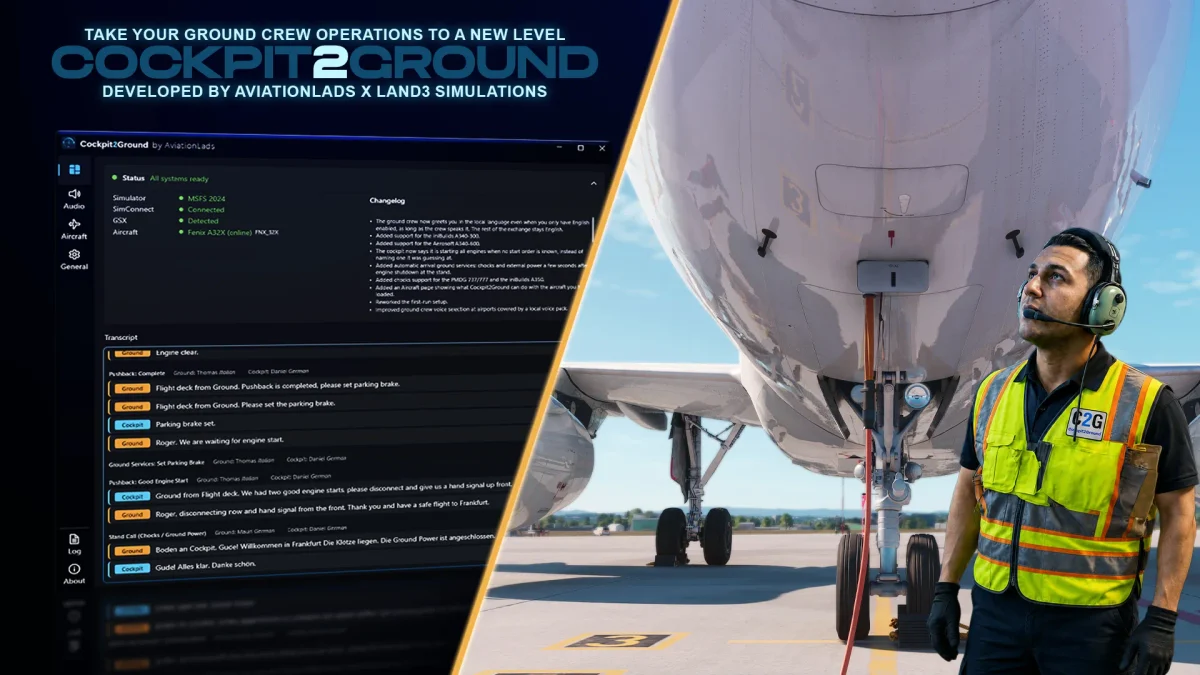
The most visible thing Cockpit2Ground does is replace the voice communications from the GSX pre-recorded messages that play with certain commands and actions, with many more triggered phrases using AI-generated voices. For example, GSX will have the ground “talk” to the cockpit when you request preparation for pushback, the pushback itself and subsequent engine start and disconnection. Cockpit2Ground will add many more interactions and reactions to current conditions (more on this later), from the moment you step into the cockpit until the crew disconnects, including what GSX already communicates, but also adding radio effects, plus personnel variation, tone and accent to those comms, for both the ground crew and the pilots.


You have to understand, however, that there are also a couple of things it needs to do in GSX to work properly. It asks permission to turn off GSX’s own comm system by muting the comm voices and the on-screen messages that GSX depicts. Mind you, this is something you can already do inside GSX’s menus if you don’t want to hear its voices or read the messages. These are also optional steps, recommended but not mandatory. If you don’t allow this to be muted, however, GSX will still play its comms, which will be overlapped by Cockpit2Ground’s own comms. And the on-screen messages will differ somehow from what is being “said” by the app.
“Cockpit here, we have a good engine start”
Cockpit2Ground works on an external app you can choose to run automatically or manually. Personally, I have it running and closing on simulator run, meaning it will launch when the simulator starts up and close when it shuts down. But you can also run the app manually if you prefer not to have it running in the background all time. Again, the app will only work if GSX is active, but it runs fully independently from it. There is a fully automated mode to run this app, so you can ignore it running in the background and continue to operate GSX as you normally would. But I suggest you run through the app’s options first, setting up everything before “unleashing” it.
First of all, let me compliment AviationLads and LAND3 for the app design. It’s a very sober design, very well organized. I would like to have some customization options in terms of colours and overall scheme, but that’s a personal preference of mine. As is, it’s a good user interface, pretty straightforward. The only thing I really wished to have was the ability to have all these options in-game, perhaps using the MSFS toolbar or even integrated into Asobo’s Electronic Flight Bag. Especially if you run a single monitor, these third-party external apps tend to be a bit of a nuisance, since you have to use the Windows Task Manager to switch between them. Future update?


You’ll see that the app will record all the communications it “voices” in plain text. This is especially useful if you have trouble understanding what’s said due to thick regional accents. We’ve seen other programs that rely on Artificial Intelligence do this and there is another “obscure” reason for that. AI doesn’t just “talk”. It generates speech in the written form that is then processed using “text-to-speech” tech. So it’s only natural the text is also recorded, even if sometimes some aberrations may happen, like spelling out words letter by letter instead of saying them. Granted, I never heard this with C2G, it’s completely expected with AI.
“- Ground to Cockpit, welcome to Skynet!
– What?
– I mean, welcome to Sky Harbour!”
The greatest advantage of using AI here is that you can have such a dynamic conversation with it. I’m not just talking about accents or “moods” between the characters used, I’m actually talking about significant variations between sessions, phases and even different weather conditions. Effectively, no flight is similar to the next, even if you pick the same origin or destination, the phraseology is always correct, but never the same. This, of course, makes the conversations as “real” as possible, not really repeated, but following kind of a “loose” script.
Obviously, you can’t really diverge too much by talking about the last football match with your crewman. First of all, you, the human, are not talking to the AI directly. The program simulates that it’s your PNF (Pilot Not Flying) doing the comms with the ground crew, meaning that you will not interact with it directly, like you do with programs like BeyondATC, for example. Yes, I too would like that to be an option, but “voice recognition” is currently out of scope for this project. If you think about it, though, it’s somehow realistic to have your fellow pilot do these comms in the cockpit. But, hey, I’m a fan of “doing it all”. Another possible future update?

I was amazed how “humanized” this AI really is. It’s very polite to say “good morning” (or any other time of day) as a greeting. It’s also very cool to hear its customized send-off when disconnecting. But I also enjoyed a very subtle addition that ended up being quite immersive too: the fact the cockpit pilot does respond to and command the ground crew. With GSX, there were only about three or four phrases the pilots sent out, basically direct commands, such as “prepare for pushback”. Now, the AI pilot is much more verbal, with actual instructions and reactions in all phases. Awesome, really.
Just because the app doesn’t replace GSX functions, it doesn’t mean it can’t “control” it to some extent. For example, it will command the GPU disconnection if you turn off ground power in the cockpit. This is cool because previously you’d have to command that manually, either on the aircraft EFB options or in the GSX menu itself. It can also alter the flow of the operations. For example, on a rainy day, engine startup can be slightly delayed. It also changes the de-Icing flow quite a lot, mimicking the real-life procedures much more closely. I did find a couple of instances where it didn’t detect rain correctly, but I think the weather injection dynamically changing my weather conditions might have been the culprit.
Yes, the app will detect the current weather depicted and adjust. But that’s not the only detection it can do. It can even detect if the ground agent is male or female to load the correct voice sets. Another impressive feature is that the app will also recognize the tow type and will interact differently if it’s a tow truck or a towbar with a tug. This will change the procedures slightly as you may realise. The app does all this for us, we don’t have to pre-select anything at all. One cool (optional) feature you can set up is the ability to have volume control using the aircraft’s own audio panel. Just make sure that button or knob is actually functional on your favourite add-on.

Currently, the program supports English speech by default, but also includes German, French, Dutch, Italian, Spanish, Polish and Turkish sound sets. It’s missing some other languages, for sure, but bear in mind that ground crew communication should be in English anyway, at least in most international airports. What about a “localized” experience? If you include your Simbrief info, the app will recognize the departing and arriving airports and what airline you are flying to give you the proper language (if dynamic language is chosen) or local accents. The team says the app includes about 180 unique voices to make this happen. And that’s quite impressive, to be honest.
Final Thoughts
I didn’t believe I needed Cockpit2Ground until I tried it, to be honest. At first, it sounded like one of those “unnecessary redundancies” and it would really be just that if all it did was add a few “voice sets” randomly playing to give you a false sense of “variation”. That’s certainly not what Cockpit2Ground is, however. During my testing phase, I had to turn it off to make a couple of my regular livestreams and, man, did I miss it. Suddenly, all that immersion went away and the standard GSX voices became “insufficient”. This is the actual selling point of this product, at least for me. AviationLads and LAND3 did an excellent job creating an application that really enriches Flight Simulation.
GSX is the ultimate ground handling experience, from the moment you arrive in the cockpit and depart, to the moment you land, taxi to the gate and shut it down. Cockpit2Ground doesn’t just replace its voices, it improves them, adds yet another level of realism to all that GSX does and in the end, you kind of feel you can’t fly without it anymore.
Overall, Cockpit2Ground worked really well during the pre-release phase I got access to. There were a few items that needed polish or integration, such as the single-engine taxi procedures that were added close to release. This option needs to be manually toggled to make it work, much like the engine start order selection. But I think this option is somehow misplaced in the menu and looks like an “afterthought”. SETI (Single Engine Taxi In) and SETO (Single Engine Taxi Out) are now, pretty much, the norm in modern-day aviation. It should be part of the normal procedures, not a “togglable” option.
Cockpit2Ground will be released by September 8th, 2026, only available at the Contrail online shop, priced at 14,99€ (or your local equivalent). And that is just another highlight. It’s not a subscription program, it’s not an overpriced deal, it’s just a fair price for an add-on that does so much. I would imagine this type of software retailing for way more than that, but the guys at AviationLads and LAND3 decided to price it just right, in my opinion. Of course, we don’t know if this price will change over time. Production changes, investments also tend to increase sometimes. If new features are added, it’s possible this price will increase. However, as is, it’s a real bargain.
I’ll end with a few remarks about something I mentioned above. At the moment I’m writing this review, we don’t know if FSDreamTeam will have something to say about this program’s existence. It’s not my place to comment on legal stuff or even to dwell on the possibilities. I have been using GSX for many years, always enjoying it, but also lamenting its many shortcomings. This software intends to improve it and I think that’s always something positive. I believe AviationLads and LAND3 Simulations have covered all the implications, it’s even possible they have an agreement between parties. But one thing is certain, whatever happens next, I can’t use GSX without Cockpit2Ground running anymore. So, that, I believe, says it all.

Verdict 9/10 (Highly Recommended)
Pros
- Easy to use, can be fully automated
- Amazing immersion with so many new lines and logic added
- Incredible amount of voice sets with many accents and variations
- Realistic depiction of ground ops communication
- Respectful of all that GSX does, improving what it can
- Integration with the aircraft intercom (INT) radio volume
- Integration with Simbrief, detecting the airports and airlines used
- All the small automations it adds
- The app’s interface is sober and easy to use
Cons
- The app could be fully integrated into the MSFS toolbar
- It would be so much better with “voice recognition”