








The free add-on manager has been a solved problem in Microsoft Flight Simulator for a long time. MSFS Addons Linker has handled the job since 2020, and over the past few months the category has filled out fast. We looked at PERFLIGHT, which wraps library management and pre-session prep into one free package, and at the paid Bob Dispatcher, which stacks route-aware activation and shader cleanup on top. So a new free entry needs a reason to exist. Preflightly‘s reason is a Route Finder that looks at your hangar and tells you what you can actually fly tonight.
How it works
Preflightly is a desktop app for MSFS 2024, with no support for the 2020 version. The current model is symlink based: your add-ons stay wherever you keep them, whether that is one big library or several (your existing Linker library, your Orbx folder, your Aerosoft One content, and so on), and Preflightly only creates the symbolic links in the Community folder for whatever you switch on. Toggle something off and the link disappears. The developer says nothing is ever moved, copied or duplicated, and that a single Reset removes every link it created.
The earliest public builds used a different strategy that moved files into one managed library, but that caused troubles which led to a rebuild of the core model in early June.

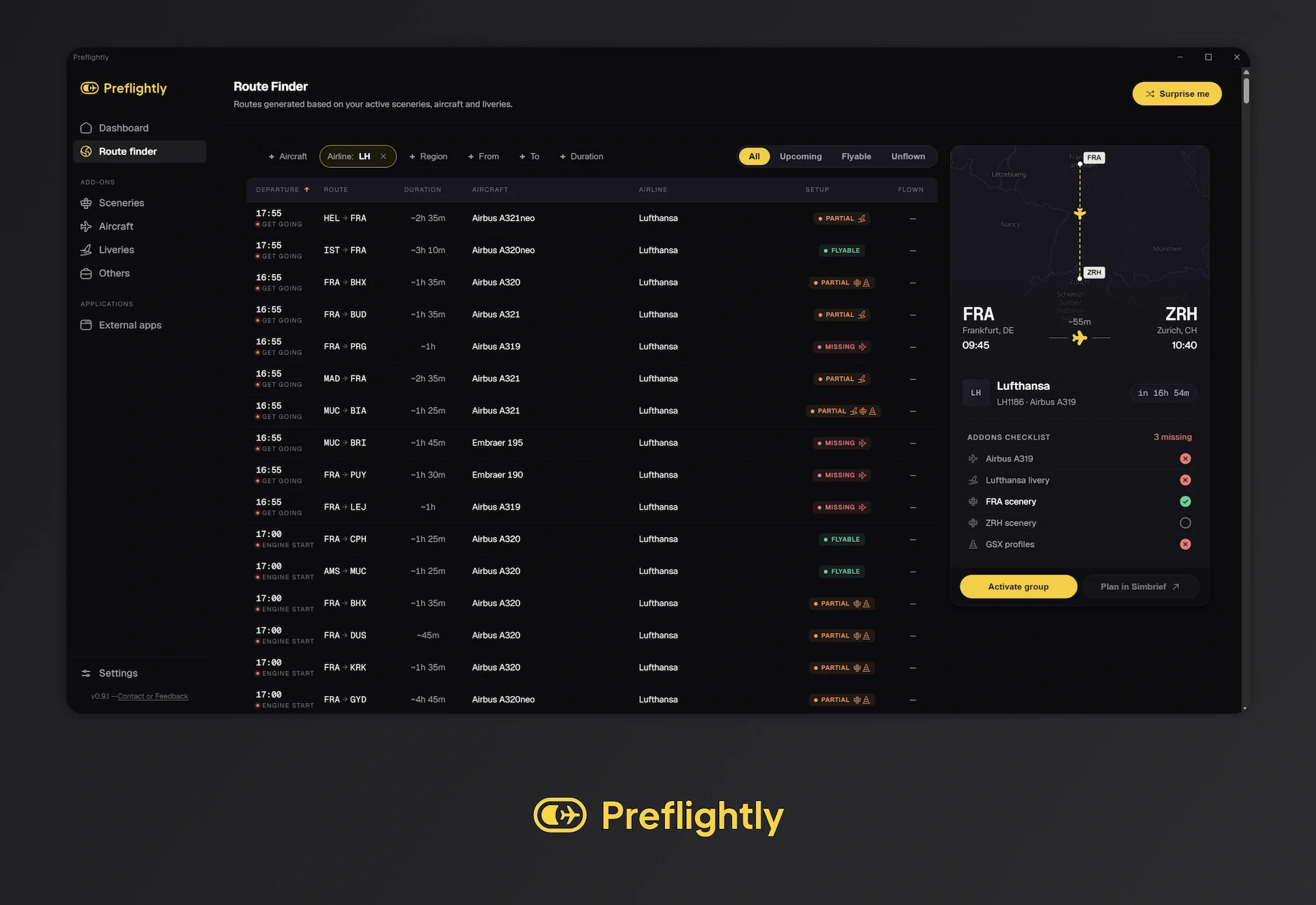
The Route Finder is the differentiator
The headline feature cross-references more than 70,000 commercial routes against everything Preflightly can see. That includes Marketplace and Official MSFS airports and aircraft, not only third-party content, so an enhanced default airport counts as coverage and the stock liveries that ship with Asobo aircraft count too. Aircraft matching also goes past a strict type lookup. The developer says that if a route calls for an A321 and you own a Fenix A320, the tool offers the Fenix as a sensible substitute from the same family. Pick a route and Preflightly activates the right add-ons for it.
Around that sit a SimBrief export, a live countdown to departure on every route, and a day, night, dawn or dusk tag worked out from the real sun position along the flight.
This is the same route-aware idea behind PERFLIGHT’s Smart Actions and Bob Dispatcher’s SimBrief reading, turned around. Instead of building a flight and activating what it needs, you start from what your library can already fly. A cool little trick.
GSX profiles and a launcher
The most recent update, version 0.11.0 from mid-June, added a GSX Profiles page. The developer says it indexes every GSX Pro profile in your folder and matches each one to its airport, with a zoomable map of the stands and a Clean GSX tool that finds duplicate and orphan profiles and shows what it wants to remove before you confirm. There is also an Autorun that launches companion apps such as SimBrief, Navigraph, Little Navmap, vPilot, GSX, BeyondATC and ActiveSky in sequence before you fly.
Still early, but worth a look
It’s worth keeping in mind that this software is still in beta, so your mileage may vary. Still, Preflightly is free, and the developer states there is no subscription and no trial. If your Community folder has grown unwieldy and the idea of starting from “what can I fly” rather than “what do I want to set up” appeals to you, it is worth trying while it is in beta. You can find it at preflightly.app and on flightsim.to.
One final note: if you already run Addon Linker or another manager, pick one, because two managers competing over the Community folder will break your activations.









