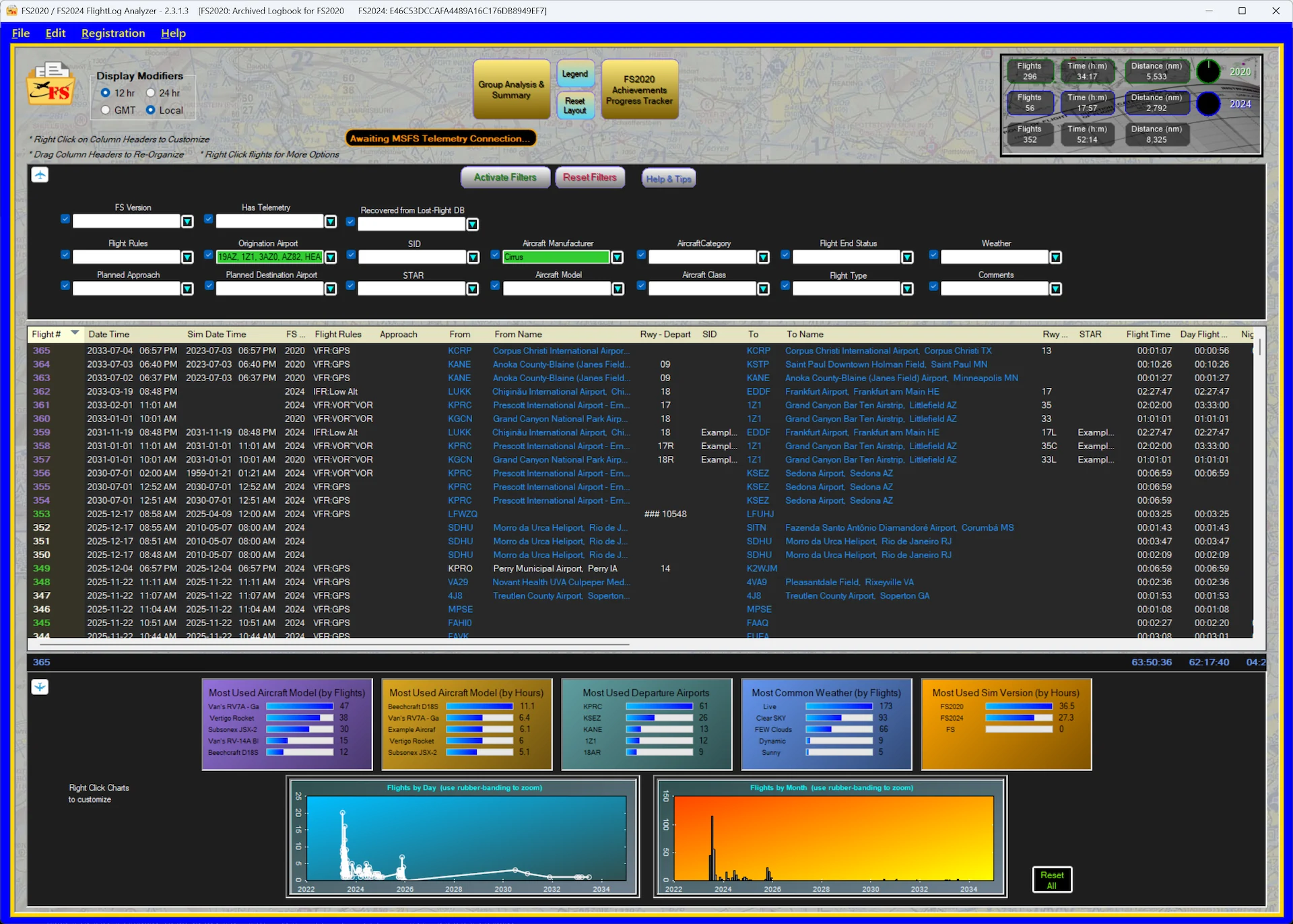
It has been nearly a year since we first looked at FlightLog Analyzer. Back in early 2025, it stood out as a helpful utility for simmers trying to merge their history across the divide of Microsoft Flight Simulator 2020 and the then-new FS2024. But as the platform has matured, the needs of the community have shifted from simple compatibility to data reliability.
With reports persisting about logbook inconsistencies in MSFS 2024 (specifically following updates that occurred last summer) the utility has pivoted. It is no longer just analyzing your flights, it’s now actively trying to save them!
A safety net for your logbook
The most significant addition in this version directly addresses a pain point that has kept some virtual pilots from fully migrating to the new simulator: data loss.
According to the developers, Gene and Fabiano, a number of users have reported flights vanishing from the native MSFS 2024 logbook, particularly since Sim Update 2. This creates a frustration loop where pilots return to the older FS2020 simply to ensure their hours are counted.
FlightLog Analyzer has introduced a “Lost Flight Protection” system to counter this. The application now records flights as they happen and maintains a local database. If the simulator’s cloud sync fails or a flight entry disappears from the native logbook, the app detects the discrepancy and restores the entry to its own display. While it cannot force the data back into the Microsoft servers, it ensures your personal record remains intact locally.
Precise telemetry
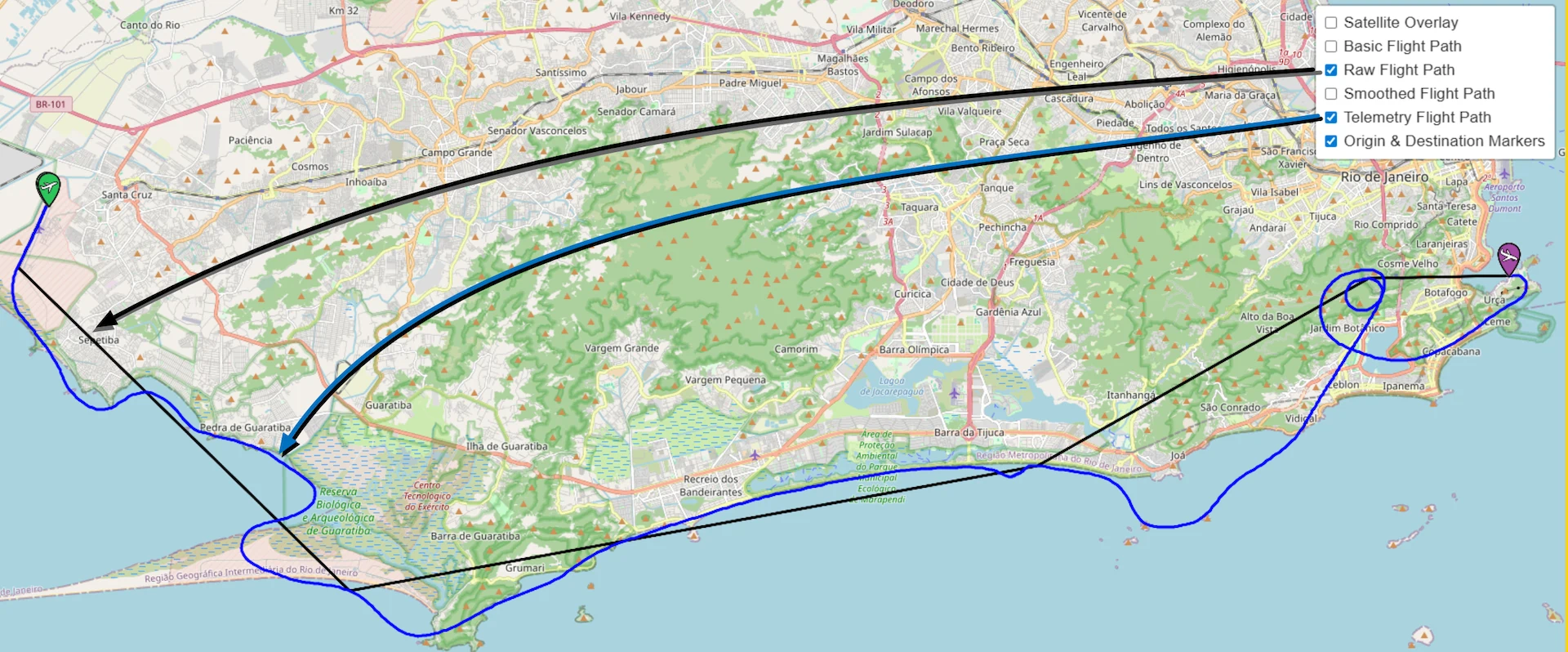
Beyond data safety, the application has upgraded how it tracks where you have been. Previous versions, like many logbook tools, relied heavily on the raw logbook files generated by the simulator. These files often contain sparse data points, resulting in flight paths that look like jagged, straight lines cutting through terrain rather than actual flight trajectories.
The tool now utilizes SimConnect to record real-time telemetry. The difference in fidelity is clear in the comparison images provided by the developers. In a flight around Rio de Janeiro, the raw data shows a rough approximation of the route. In contrast, the telemetry data captures the smooth curves of the orbit around the Christ the Redeemer statue and the exact approach path into the airport.
This increased precision allows for more detailed exports. The developers state that this rich data can now be exported to replay tools like SkyDolly with fine-grain resolution, something that wasn’t possible with the standard logbook data alone.


Data analysis and filtering
The update also expands the “Analyzer” portion of the software. The dashboard now features customizable graphs that allow users to break down their flying habits by specific attributes.
You can now visualize data such as your most used aircraft model by hours versus flights, or see which departure airports you favor. The interface also allows for grouping by simulator version, which is particularly useful for those who still split their time between FS2020 and FS2024. A new set of filters allows users to slice the logbook by complex criteria, such as specific aircraft manufacturers, weather conditions, or flight rules.
Pricing and availability
FlightLog Analyzer is available directly from the developer’s website. If you are cautious about committing to a new utility, you can test the software through a 15-day free trial. This trial period gives you enough time to see if the tool successfully tracks your flights and restores any lost data before you reach for your wallet.
The developers offer two lifetime license tiers. You can purchase the Standard license for $15.00, while the Pro license costs $19.00. Both options include all future updates. The primary difference lies in the advanced features. According to the developer, only the Pro version includes the newly introduced SimConnect flight data telemetry tracking. The Pro tier also unlocks a logbook cleaner and a flight fixer to correct missing takeoffs and landings within the simulator’s records.