







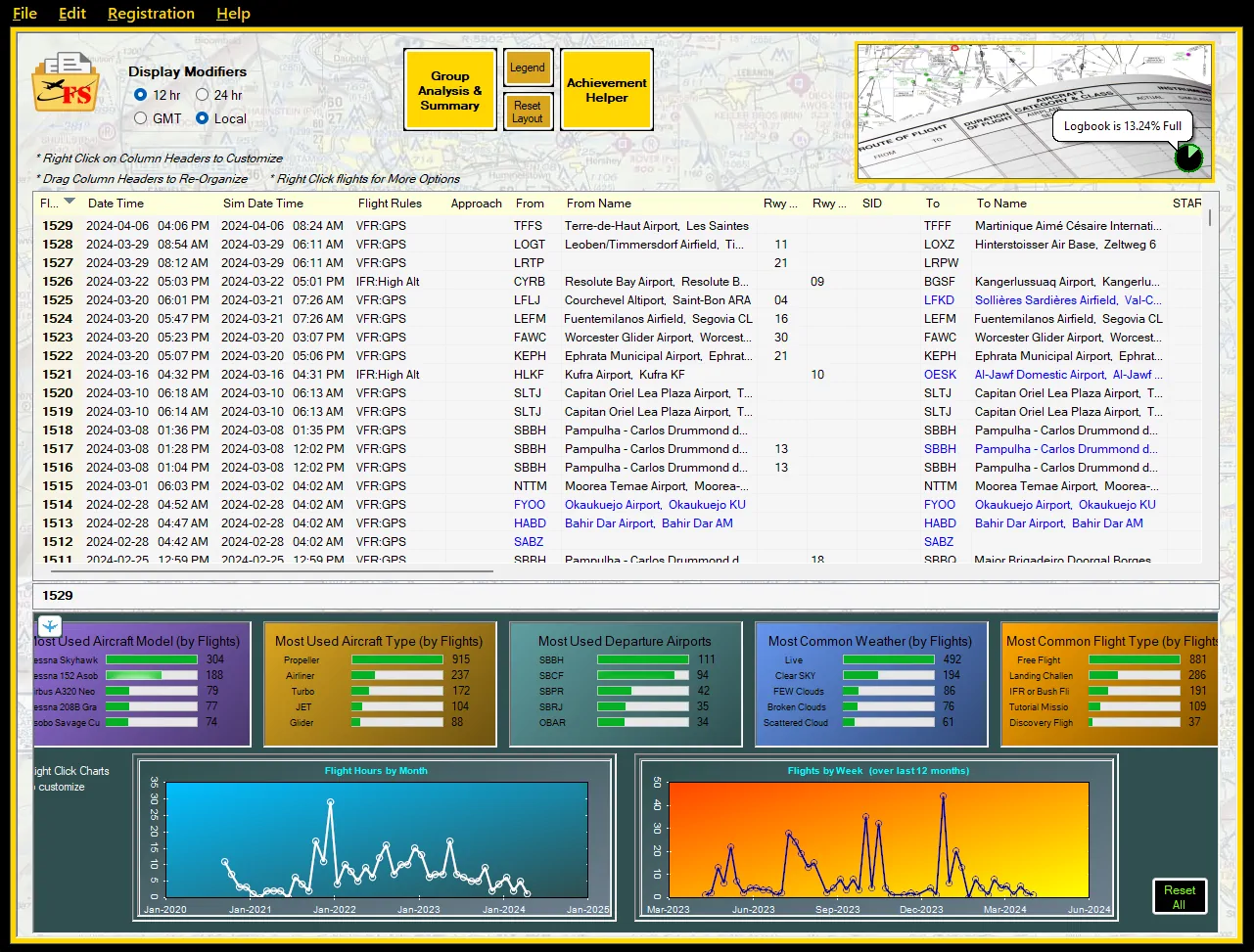
FlightLog Analyzer — the flight tracking and analytics tool “written for pilots, by pilots” — has been updated to version 2.0 and is now fully compatible with both Microsoft Flight Simulator 2020 and 2024. For simmers looking to preserve, organize, and analyze their flight history, this tool continues to offer a powerful alternative to the limited built-in logbook.
Whether you’re migrating to MSFS 2024 or just want to make more sense of your flying habits, FlightLog Analyzer provides one consolidated view of all your flights across both versions of the sim — without even launching MSFS.
We covered FlightLog Analyzer over a year ago, but the app has since got some nice upgrades. One of the most notable features in version 2.0 is the ability to merge logbooks from MSFS 2020 and 2024 into a single, unified history, helping users transition to the new sim without losing their flight records. The tool also enables archiving and safe backup of MSFS 2020 logs, so users can uninstall the older sim if they wish, without sacrificing their historical data.

Core features
FlightLog Analyzer goes far beyond logbook viewing. It includes a range of analysis and visualization tools aimed at giving users deeper insights into their flights:
- View all flights across both sim versions
Instantly access your full flight history — takeoffs, landings, aircraft, airports — in one searchable, sortable interface. - Flight route mapping
Visualize your flights on Google Earth and OpenStreetMap, showing your routes around the world. - Altitude profile charts
Generate graphs of each flight’s vertical profile to analyze your climb, cruise, and descent behavior. - Summary analysis tools
Use Excel-style grouping and filtering to view trends by aircraft, departure, destination, or any logbook attribute. - Achievements progress tracking
See which in-sim achievements you’ve completed and what remains. - Logbook editing tools
Remove unwanted or corrupted entries, and fix missing takeoffs or landings — features not available in MSFS’s native logbook. - Export your data
Export in CSV, XML, or KML format for use with Excel, LittleNavMap, Volanta, SimToolKitPro, Sky Dolly, and more. - Backup and restore functionality
Ensure your logbook is never lost, even during sim reinstalls or platform transitions.

FlightLog Analyzer works with both Microsoft Store and Steam versions of the simulator.
Pricing and availability
FlightLog Analyzer is available with a 15-day free trial, letting users explore all Standard and PRO features.
- Standard License: $15 USD — includes core viewing, analysis, export, and backup features
- PRO License: $19 USD — unlocks advanced tools like logbook cleaning and flight fixing
Both licenses are lifetime purchases and include all future updates.









