This may sound familiar to many MSFS simmers. Someone on a forum swears that dropping a single setting from Ultra to High gave them a handful of extra frames. You try it, the next flight feels a little smoother, and you’re left wondering whether the change did anything at all or whether you simply flew over a lighter area with fewer clouds.
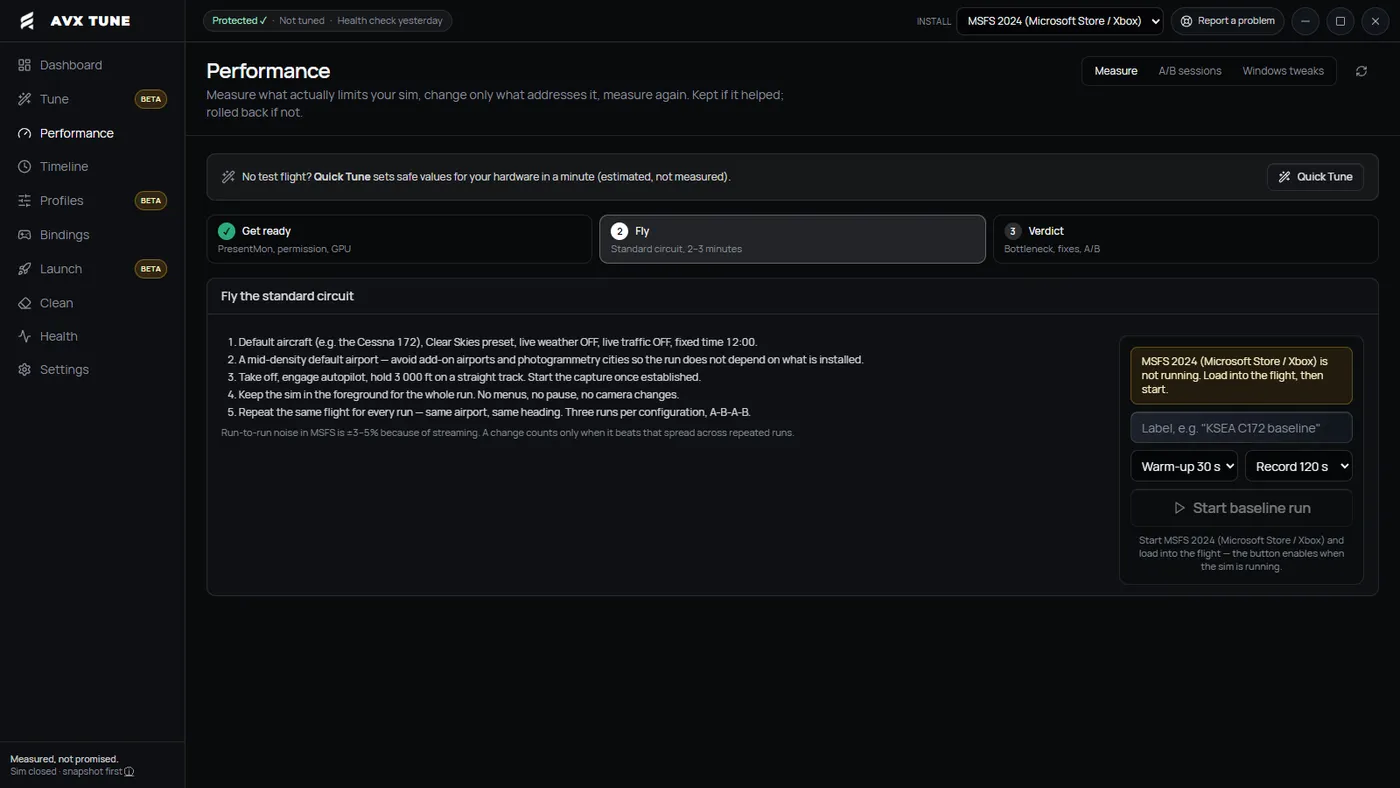
AVX Simulations thinks that guessing game can be replaced with numbers. Its new Windows utility, AVX Tune 1.0, is out now for MSFS 2020 and 2024, and the company sums up its approach with the line “measured, not promised.” In practice, the app backs up your settings before anything changes, records frame times while you fly the same short route before and after a single tweak, and then tells you whether the change helped, made things worse, or made no measurable difference.
From add-on manager to performance tool
If the AVX name rings a bell, that’s because we covered the studio’s first product back in August. AVX Sorter is an add-on manager whose standout feature automates the slow, half-and-half process of hunting down the Community folder package that keeps crashing your sim. AVX Simulations was started by two simmers, Andrey and David, and the company says Sorter grew out of a private tool they had built for their own setups.
Tune comes from a different frustration. According to the company’s founding story, Sorter users regularly asked the app for more frames, something the team says it never wanted Sorter to promise. Their view was that the existing tools answering that question either worked inside the sim’s memory or quoted performance gains nobody had actually measured, so they set out to build a separate app around measurement. The two are meant to work side by side, with Sorter handling your add-on library and Tune handling your settings, and the developer says they link to each other.
Before-and-after A/B testing
The main feature of AVX Tune is an A/B test. You start by flying the AVX standard circuit, or a short route of your own that you keep identical, two or three times to set a baseline. Tune records every frame with Intel PresentMon 2.6, the open-source capture tool. It logs presentation times along with CPU and GPU busy time. You then apply one change through the app, with the sim closed, and fly the same circuit again.


The one-change rule is key. The developer points out that changing two settings at once makes the result meaningless, so the app makes you pick one. Tune also records a snapshot of the environment with each run, covering the graphics driver, sim build, Windows power plan, Memory Integrity and frame generation. If any of those change between the before and after runs, the result is marked as invalid instead of producing a guess.
The verdict itself is where Tune tries to set itself apart from a simple FPS counter. AVX says it compares 1% lows, average frame rate and the time spent above 33 ms per frame against a noise floor calculated from your own PC’s run-to-run variation. Anyone who has flown the same approach twice and watched the FPS counter wander will see why this is useful, since MSFS rarely performs identically from one flight to the next. The result comes in one of four buckets: keep, roll back, inconclusive (fly another pair), or invalid.
Frame generation gets its own set of rules. The developer says Tune never compares a displayed frame rate that includes generated frames with a rendered one, and it won’t produce a verdict from runs where frame generation was on in one and off in the other. When PresentMon can’t tell generated frames apart, as with dynamic frame generation, the app reports that the base frame rate is unavailable instead of estimating it.
AVX says that a result showing no measurable change means the tool is working correctly, because you can then keep the better-looking setting at no cost.
Backups first, and a watcher for Sim Updates
Before any of that testing begins, Tune takes a snapshot of your UserCfg.opt file, where MSFS keeps its graphics settings among other things, along with your control bindings. The app also tracks a last-known-good configuration automatically, and its Timeline view shows exactly what a restore would change, key by key.
The Sim Update watcher also sounds quite useful. Tune takes a snapshot ahead of time so that, once an update has arrived, it can show which values were reset and offer to put the previous ones back.
A different philosophy from AutoFPS
Performance utilities aren’t new to MSFS, and you’ll probably remember about AutoFPS. We’ve covered the free tool since its MSFS 2020 days and again when it arrived in MSFS 2024. AutoFPS works while you fly, adjusting terrain level of detail and cloud quality in real time to hold a target frame rate. AVX Tune takes the opposite route. It never changes anything mid-flight, and it focuses on finding out which static settings are worth their cost on your machine.
On the safety side, AVX lists a set of rules it says are built into the code. Tune never reads or writes simulator memory, uses no injection and needs no kernel driver. It doesn’t write to the HKLM section of the Windows registry and won’t toggle Memory Integrity, HAGS or the page file. It only shows their state and where Windows keeps the switch. Settings files are written only while the sim is closed, immediately after a snapshot, and the developer says unknown keys, comments and formatting are preserved exactly. AVX also keeps a remote kill switch that can pause a specific setting for every user if a Sim Update changes how it behaves.
Price and availability
AVX Tune 1.0 is available now from the AVX Simulations website, priced at €9.99 (one-time purchase with lifetime updates.)