SimBrief, the go-to virtual dispatch tool for flight simmers around the world, just rolled out one of its most significant updates in recent memory. Whether you’re flying a short domestic hop or planning a transatlantic crossing, this latest update delivers smarter, faster, and more flexible planning tools designed to handle more real-world-like complexity, with less stress on the user.
New route calculator: faster, smarter, more intuitive
The biggest change is under the hood. SimBrief’s new routing engine calculates flight plans in seconds instead of minutes and now handles complex scenarios like avoiding specific airspaces or weather-related restrictions with improved reliability. It’s also better optimized for Free Route Airspace, giving more efficient results across Europe and elsewhere.

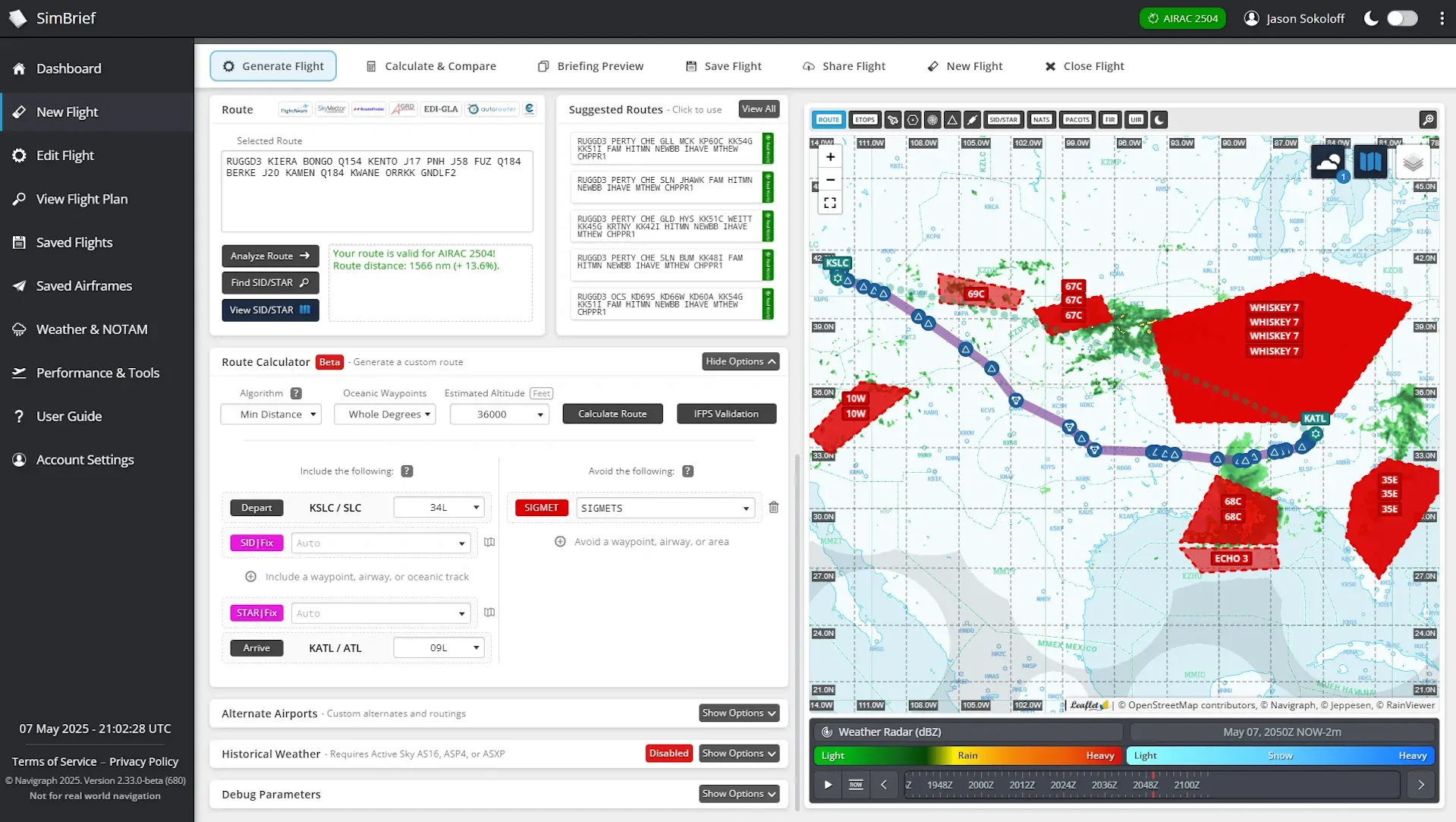
On their announcement, the SimBrief team exemplifies flying out of Salt Lake City to Atlanta with convective SIGMETs along the route. You can now instruct SimBrief to avoid those areas by selecting “All SIGMETs” or typing specific identifiers (like 67C or WHISKEY 7) directly into the route calculator. The tool will automatically generate a new route around the selected hazards and provide a visual preview of the adjusted flight path.
The same applies to ETOPS-restricted aircraft. Users ferrying older types or models not certified for ETOPS—like the MD-80—can avoid ETOPS airspace entirely with a single dropdown selection. Russian airspace is also available as a predefined exclusion.
SID/STAR previews and filtering
Choosing the right SID or STAR has also been refined. A new interactive map interface allows pilots to visualize each departure and arrival procedure directly, making it easier to select the one that matches runway configurations and routing preferences.
Each procedure is labeled as “valid,” “discouraged,” or “invalid” based on the selected runway, helping reduce the guesswork in matching your flight with what’s likely to be assigned in real-world ops.
Equipment and ATC remarks editing: now streamlined
The equipment code and ATC remark fields have received a quality-of-life upgrade. Rather than typing out ICAO codes manually, users can now edit these values using popup builders. For instance, when planning with a fully equipped A350, you can visually select every relevant capability—CPDLC, ACARS, SATCOM, etc.—from a toggled list.


The builder will automatically populate the appropriate ICAO line and ATC remarks in the flight plan, ensuring compatibility with online networks like VATSIM and IVAO, or for use with aircraft add-ons that model these systems.
Updates for all users: improved history, customization
These features are available for paying Navigraph subscribers, but SimBrief didn’t leave non-subscribers out of the loop. The flight history view has been restructured to group revisions of the same flight, helping keep things tidy. Additionally, more options—like aircraft capabilities and flight remarks—can now be modified directly from the main flight planning page without digging through menus.
Summary: a better planning experience across the board
This update is all about flexibility and precision. With real-time SIGMET avoidance, ETOPS routing, and interactive procedure selection, SimBrief continues to bring dispatch-style realism to the desktop simmer. The new tools also serve the growing ecosystem of advanced airliners in Microsoft Flight Simulator—particularly those where accurate nav data, equipment codes, and realistic routing are more than just nice-to-haves.
SimBrief is available for free to all users and integrates directly with Navigraph accounts for access to the latest AIRAC data and charts.