








Pulsar Sim is back with a fresh development update on Fly the Line – Short Haul Edition, the upcoming airline pilot career add-on for Microsoft Flight Simulator. Following December’s initial feature overview, this new post offers a much more detailed look at the setup phase—highlighting how simmers will build their virtual airline, define personal preferences, and generate realistic schedules that shape their day-to-day flying experience.
And there’s more than just flight planning. A few surprises emerged from recent testing with the Just Flight team, including new features and refinements that have added some development time but also significantly expanded the scope of the add-on.
Career, Free Play, or Just the Schedule
The big headline here is that Fly the Line will now offer three distinct game modes:
- Career Mode is the “intended” way to play. You start as a junior airline pilot and climb the ladder over time.
- Free Play gives you the same structure but with all options unlocked from the start.
- Schedule Mode strips things back, removing lifestyle and career elements to focus purely on route generation.
You’ll be able to create up to eight separate profiles, allowing for parallel careers across different airlines, aircraft, and play styles.


Once your pilot profile is ready, the next step is creating the airline you’ll work for. This isn’t an airline management simulator, so there’s no need to balance financials or oversee fleets. The focus is squarely on you—your schedule, your downtime, your decisions.
You can choose to model your career on a real-world airline—almost all are included in the database—and customize elements like base airport, flight duration, and sector count. You can choose, for example, to fly as if you’re with easyJet but only operate flights under 90 minutes.
There’s also support for fictional airlines, where you can define everything from scratch. Pick a base, generate a list of routes, and start fine-tuning your schedule to suit your time constraints or preferences.
Airline and schedule customization
Fly the Line includes an extensive set of filters and advanced settings for those who want more control. You can:
- Select aircraft type
- Define flight duration ranges
- Choose number of sectors per day (2, 2 & 4, or all 4)
- Set preferred turnaround times
- Include or exclude specific airports, countries, or entire regions
- Integrate your add-on airports, with options to prioritize them or reduce their frequency
There’s even a slider to adjust how often routes are duplicated, reflecting real-world operations where you often see repeat destinations. You’ll be able to turn it down to get more variety.
And if things get too repetitive or you simply change your mind, you can edit your airline’s settings at any time via the main dashboard.
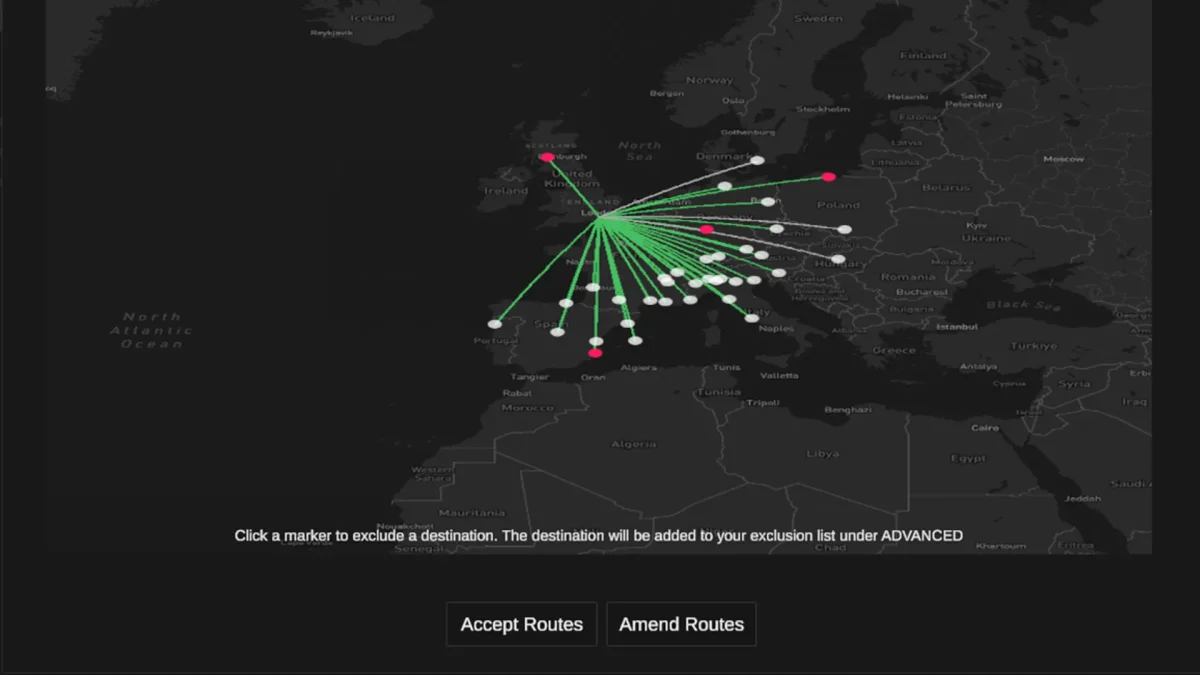


Career mode also introduces random diversions that simulate operational disruptions. You’ll be prompted to decide whether to continue to your destination or reroute to one of several suggested alternates. The frequency of these events can be adjusted or disabled entirely, depending on how much unpredictability you want in your flying day.
Using easyJet out of London Gatwick as an example, the developer demonstrated a weekly schedule generated with a flight duration range of 60 to 150 minutes. Fly the Line then built out a week filled with real-world routes tailored to those parameters.
Add-on airports show up as red markers, and any excluded destinations are remembered across profiles.
One important note: flight durations are customized to support the time management gameplay loop. So while the routes are accurate, don’t expect real-world block times. The goal is to keep the experience engaging and in sync with your in-sim lifestyle elements.
The developer says the initial release of Fly the Line – Short Haul Edition is nearing completion and reiterates that community feedback will play a key role in post-launch development. Future updates will cover the main dashboard, daily activities, and flight summaries.
Fly the Line – Short Haul Edition is being developed with support for MSFS 2020 and 2024 and other platforms like X-Plane and Prepar3D. No release date has been announced yet.









